 AbsentMotion
Exposure
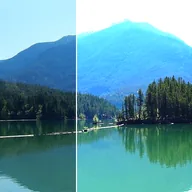
Simulates photographic exposure with stops, offset, and gamma correction. Brighten See-Through Parts lets partly transparent pixels, such as a blurred edge, brighten past white.
Stops brightens or darkens the picture the way a camera does: one stop doubles or halves the light, and it goes from -4 to 4. Offset lifts or lowers everything evenly, and Gamma changes the midtones.
Settings
| Setting | Type | Range | Default |
|---|---|---|---|
| Stops | Number | -4 to 4 | 0.7 |
| Offset | Number | -0.5 to 0.5 | 0 |
| Gamma | Number | 0.1 to 10 | 1 |
| Brighten See-Through Parts | On or off | – | Off |