 AbsentMotion
The Add menu
How to add shapes, photos, video, sound, text, drawings, cameras, lights, 3D models and more.
The round + button at the bottom right of the timeline area opens the Add menu. It only shows when nothing is selected; selecting a layer replaces it with the tool grid.
New layers start at the playhead and last as long as the New Layer Length setting (2 seconds by default). Photos and shapes use that length; videos and sounds use their own length. Camera and light layers last the whole project.
The menu has five tabs along the top (Shape, Media, Audio, Object / Asset and Template) and four quick buttons on the right. The X closes it.
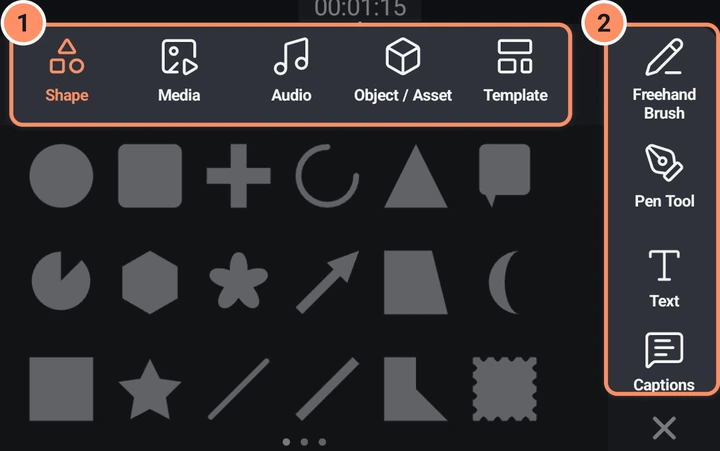
Quick buttons
- Freehand Brush creates a drawing layer and opens the drawing editor. See Shapes, drawing and masks.
- Pen Tool creates a shape layer and opens the point editor so you can draw a shape point by point.
- Text adds a text layer and opens the text editor at once. See Text and fonts.
- Captions opens the Auto Captions sheet. See AI tools.
Shape
Fifty-four ready-made shapes, six to a row, in pages you swipe through. Tap one to add it in the middle of the canvas with a random pleasant color.
Nineteen shapes are parametric and are edited with Shape Options: Circle, Rounded Rectangle, Plus, Arc, Triangle, Callout, Pie, Polygon, Multifoil, Arrow, Quad, Moon, Rectangle, Star, Line, Wide Line, Irregular Pentagon, Stamp and Teardrop. The other thirty-five are drawn with points and are edited with Edit Points: Heart, Cloud, Lightning Bolt, Check Mark, X Mark, Ring, Speech Bubble, Shield, House, Bookmark, Flag, Crescent and Star, Sun, Leaf, Seal Burst, Hexagon Outline, Star Outline, Chevron, Double Arrow, Curved Arrow, Parallelogram, Trapezoid, Ticket, Tag, Crown, Eye, Umbrella, Music Note, Droplet Pair, Key, Location Pin, Rounded Play, Pause, Record and Gear.
Media
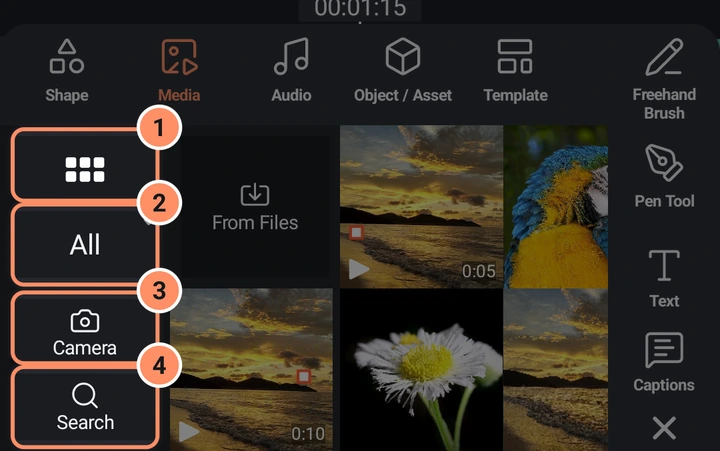
Your photos and videos, newest first, in a grid. Tap one to add it, sized to fit the canvas.
- View All opens Android's own photo picker. It needs no permission.
- From Files, the first tile of the grid, opens Android's file picker so you can take a photo or video from any folder. It needs no permission either.
- The album list at the top narrows the grid (the default is All).
- Camera opens the in-app camera. See Creating a project for the camera controls.
- Search looks through the grid ("Search photos and videos").
- SVG files from your gallery also show up here.
The first time, Android asks for permission to see your photos and videos. On Android 14 and newer you can allow only the ones you pick. By default the app keeps a copy of added media inside the project, so the project still works if you delete the original later.
Audio
Music and sounds stored on your phone. The first time, the app asks for permission to read audio files.
- View all opens a file picker for audio files.
- From Files opens Android's file picker, so you can take an audio file from any folder. It needs no permission.
- Text to Speech turns typed text into a voice: see Audio.
- Tap a sound tile to hear it, and tap again to stop. Tap the + strip at the bottom of the tile to add it to the project at the playhead.
- Search music and sounds matches the title, file name, album and artist.
Object / Asset
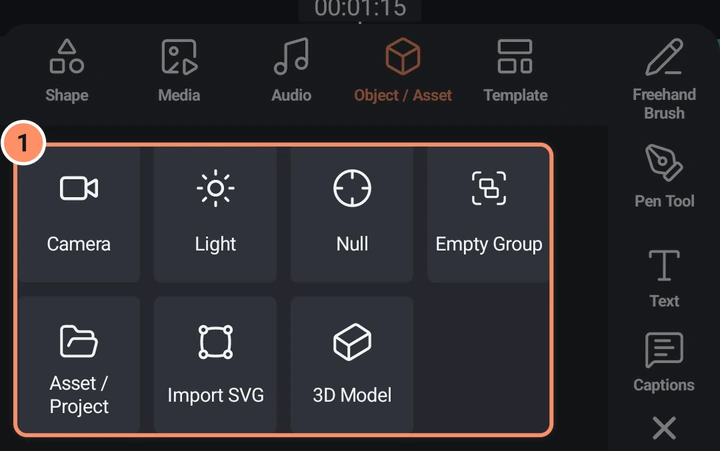
Seven tiles for other kinds of layers.
- Camera adds a camera layer that lasts the whole project. See Camera layers and 3D.
- Light adds a light that shades 3D models and the pieces of 3D effects. See Camera layers and 3D.
- Null adds an invisible helper layer. Use it as a parent for other layers or as a target for motion tracking.
- Empty Group adds an empty group.
- Asset / Project lists your saved assets, then your other projects. Tap one to insert it as a group at the playhead. An asset stays linked to its source; a project is inserted as an independent copy. See Assets, templates and presets.
- Import SVG opens a file picker for
.svgfiles (up to 16 MB). One shape becomes a shape layer; several become a group. A message lists what could not be imported: text, images, embedded content, animations, clipping paths, masks, filters, markers, dashed or gradient strokes and pattern fills. Gradients keep only their first and last color. - 3D Model opens a file picker for
.obj,.glband.gltffiles. Pick the model's material and picture files with it if it has them. The files can total up to 256 MB, and a model with more than 50,000 triangles is shown in a simplified form.
Template
View All shows a full-screen grid of your saved templates, and below it each template has a tile. Tapping one opens the screen where you swap in your own media. With no templates yet, the page says "There's nothing here. Projects you save as templates show up here." See Assets, templates and presets.