 AbsentMotion
Color Balance
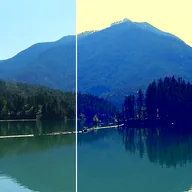
Pushes the shadows, midtones and highlights towards their own colors (gray leaves a range unchanged).
Three color swatches, Shadows, Midtones and Highlights, push the dark, middle and bright parts of the picture toward their own color. A gray swatch leaves that range unchanged. Amount blends the result with the original. The default look is a teal-and-orange tint: cool shadows and warm highlights.
Settings
| Setting | Type | Range | Default |
|---|---|---|---|
| Shadows | Color | – | #3060A0 |
| Midtones | Color | – | #808080 |
| Highlights | Color | – | #FFB070 |
| Amount | Number | 0 to 1 | 0.5 |