 AbsentMotion
Brightness & Contrast
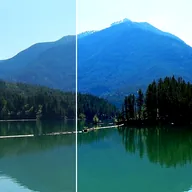
Adjusts the brightness and contrast of the image.
Brightness lightens or darkens the whole picture. Contrast pushes light and dark areas apart (or together with negative values). Use small changes first: both go from -1 to 1. For more control over shadows and highlights, use Levels or Highlights & Shadows.
Settings
| Setting | Type | Range | Default |
|---|---|---|---|
| Brightness | Number | -1 to 1 | 0.1 |
| Contrast | Number | -1 to 5 | 0.3 |
| Style | Choice | Per Channel, Keep Colour | Per Channel |